KDP To Do List Notebook Interior: Streamlining Your Publishing Workflow
Creating a successful low-content book on Amazon requires more than just uploading a generic template; it demands a strategic approach to interior design that balances user functionality with publishing efficiency. The KDP to Do List Notebook Interior is designed specifically to bridge the gap between creative customization and technical readiness. For self-publishers, the primary challenge often lies in sourcing high-quality interiors that are not only visually appealing but also formatted correctly for print. This resource addresses those pain points by providing a comprehensive package that includes editable source files alongside a print-ready PDF, ensuring that your final product meets both market standards and personal branding goals.
Overcoming Common Self-Publishing Challenges
Many aspiring authors and entrepreneurs face significant hurdles when entering the planner and notebook niche. One of the most frequent obstacles is the lack of professional design software skills or the budget to hire a graphic designer for every new title. Relying solely on pre-made, non-editable PDFs can limit your ability to differentiate your brand in a saturated marketplace. Conversely, starting from scratch in complex vector software can be time-consuming and prone to formatting errors, such as incorrect bleed settings or margin violations.
The KDP to Do List Notebook Interior solves these issues by offering a hybrid solution. By including both Adobe InDesign and PowerPoint files, this pack empowers users regardless of their technical proficiency. If you are a seasoned designer, the InDesign file allows for granular control over typography, grid systems, and layout adjustments. If you are a beginner or prefer a more accessible tool, the PowerPoint file enables straightforward text and element manipulation without a steep learning curve. This flexibility ensures that the barrier to entry remains low while maintaining high production value.
Strategic Layout Features for User Retention
A notebook is only as valuable as its utility to the end user. When customers purchase a productivity journal, they are looking for structure that aids their daily workflow rather than hindering it. This specific interior has been curated with practical functionality in mind, featuring essential sections that drive repeat usage and positive reviews.
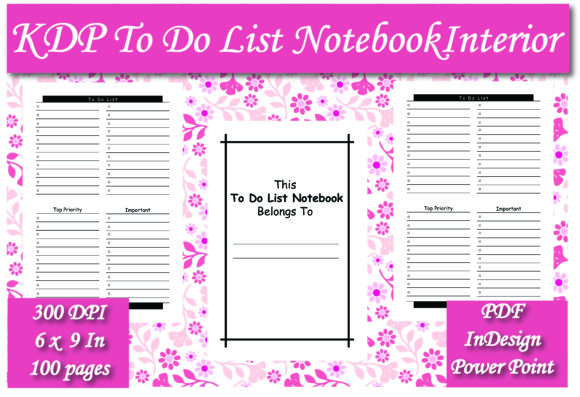
- This To Do List Notebook Belongs To: A dedicated ownership page is crucial for personalization. It transforms a generic commodity into a personal tool, increasing the perceived value of the book and encouraging users to keep it organized.
- To Do List Section: The core of the notebook provides ample space for daily task tracking. The layout is designed to be clean and uncluttered, reducing cognitive load and allowing users to focus on execution rather than navigation.
- Top Priority Field: Productivity experts consistently recommend identifying the single most important task of the day. Including a specific prompt for top priorities helps users practice effective time management techniques like the "One Thing" method.
- Important Notes Area: Tasks rarely exist in a vacuum. Having a designated space for context, deadlines, or related thoughts prevents users from needing to flip between pages, keeping all relevant information centralized.
These elements are not merely decorative; they are functional components that address real-world organizational needs. When your KDP to Do List Notebook Interior facilitates genuine productivity, it naturally garners better feedback and higher conversion rates.
Technical Specifications and Print Readiness
Beyond the visual layout, technical compliance is non-negotiable in KDP publishing. A beautifully designed interior that fails Amazon’s automated review process results in lost time and potential account warnings. This resource is pre-formatted to the industry-standard 6 x 9 inch trim size, which is arguably the most versatile dimension for productivity notebooks. It is compact enough for portability yet spacious enough for detailed writing.
The inclusion of a ready-to-upload PDF eliminates guesswork regarding margins, bleed, and resolution. At 100 pages, the interior hits a sweet spot for spine width and pricing strategy. Books that are too thin can feel insubstantial, while those that are too thick may intimidate users looking for a quarterly or monthly reset. A 100-page count allows for approximately three months of daily use or several months of weekly planning, making it an attractive option for seasonal launches or habit-tracking challenges. Furthermore, having the source files means you can easily adjust the page count in future editions based on customer feedback without redesigning the entire asset.
Customization Strategies for Brand Differentiation
In a competitive category, uniqueness is your strongest asset. While the base KDP to Do List Notebook Interior provides a solid foundation, your success depends on how you adapt it to serve a specific niche. The editable nature of this pack encourages strategic modification rather than passive usage.
For example, if you are targeting fitness enthusiasts, you might rename the "Top Priority" field to "Main Workout Goal" and add a water intake tracker to the "Important" section. If your audience consists of students during exam season, you could adjust the headers to reflect study blocks and assignment deadlines. Even subtle changes, such as altering fonts to match your cover design or adding a motivational quote to the footer, can create a cohesive brand experience that sets your book apart from generic competitors.
PowerPoint users can leverage master slides to apply global changes across all 100 pages instantly, ensuring consistency. InDesign users can utilize paragraph styles and object libraries to experiment with different layouts rapidly. This level of adaptability turns a single purchase into a scalable asset library for multiple titles.
Practical Applications Across User Segments
Different publishers approach low-content books with varying objectives, and this interior supports multiple business models. For volume publishers, the ready-made PDF allows for rapid testing of new niches with minimal upfront investment. You can upload the standard version to validate demand before investing time in customization.
For brand builders and coaches, the editable files serve as a lead magnet or companion product. You might customize the interior to align with a course curriculum or coaching program, using the notebook as a tangible extension of your digital content. In this context, the KDP to Do List Notebook Interior becomes part of a larger ecosystem rather than a standalone commodity.
Educators and corporate trainers may find value in creating branded workbooks for workshops. The ability to modify the "Belongs To" page to include organization logos or workshop dates adds a layer of professionalism that generic store-bought notebooks cannot offer. Regardless of your specific goal, the key is to view this interior as a starting point for solving a specific problem for a defined audience.
Making the Most of Your Digital Assets
To maximize the return on this resource, adopt a workflow that prioritizes quality assurance. Always open the PDF in a pre-flight checker or Amazon’s previewer tool before publishing, even if the file is labeled as ready. Verify that your customizations have not shifted elements outside the safe zone. Test print a single copy to evaluate paper opacity and binding quality, as screen rendering can sometimes differ from physical output.
Additionally, consider the metadata implications of your interior choices. If you customize the fields to target a specific demographic, ensure your title, subtitle, and backend keywords reflect those modifications. A notebook marketed as a "Generic To Do List" will face stiffer competition than one positioned as a "Nurse Shift Planner" or "Real Estate Agent Daily Organizer," even if the underlying KDP to Do List Notebook Interior is fundamentally similar. Aligning your interior features with your marketing message creates a congruent customer journey that builds trust and drives sales.
Ultimately, the value of this pack lies in its balance of convenience and creative freedom. It removes the technical friction of formatting while preserving the strategic advantage of customization. By leveraging both the ready-to-use and editable components, you can build a sustainable publishing workflow that adapts to market trends and evolves with your business.